Draw on your Mac screen during a presentation
When you walk people through a screen, an arrow or a circle says more than “the third line from the top”. macOS has good drawing tools, but none of them draws live over every app. Here are the options.
1. Markup on a screenshot or PDF
Take a screenshot (⇧⌘4), click the thumbnail in the corner and use Markup to draw, add arrows, shapes and text. Preview offers the same Markup tools for images and PDFs. That is good for documents you send afterwards. During a live presentation it means stopping, capturing and then sharing the marked up image.
2. Freeform as a whiteboard
Freeform, which comes with macOS, is a canvas for sketches, notes and images. You can share the Freeform window and draw on it. It works well for a whiteboard moment, but you draw inside Freeform, not over the app you are presenting.
3. Annotation tools of your call app
Some video call apps have their own annotation tools for what you share there. They only work inside that app and differ from one app to the next.
4. Draw over any app with Manicule
Manicule draws on a clear layer above your whole screen, over whatever app you present. Press ⌃⌥H, then hold and drag to draw. Click to show a tap with a ripple. ⌘Z undoes, ⌫ clears, Esc puts the hand away and clears everything.
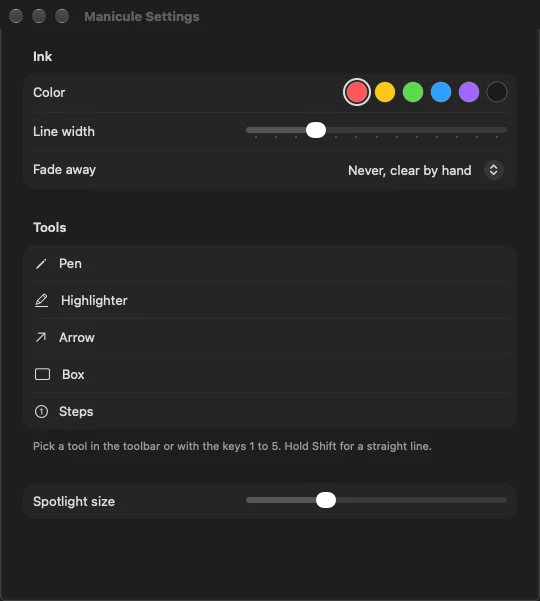
- Free: the pen in one color, the laser dot (L) and undo.
- Pro: highlighter, arrow, box and numbered steps (keys 1 to 5), six ink colors and ink that fades by itself after a few seconds.
- Hold Shift for a straight line. T shows or hides the small toolbar at the bottom.
While the hand is on, your clicks do not reach the apps underneath. Press Esc or ⌃⌥H when you want to work normally again.
Manicule turns your pointer into a little hand on a stick: click to tap with a sound and a ripple, drag to draw, Esc to put it away. No permissions, free to use for good, Pro is €4.99 once.
See Manicule